
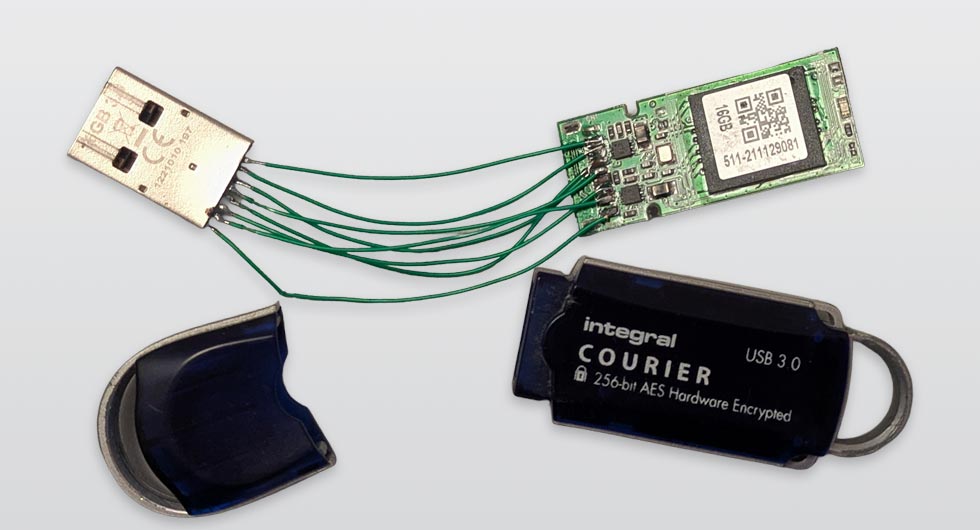
USB data recovery is often needed when physical damage makes a device unreadable. In this case, a customer brought in a snapped USB thumb drive containing years of teaching materials, reports, and important documents. The damage looked severe, but the data itself was still recoverable with the right approach.
Assessing the USB Data Recovery Challenge
The USB drive had completely snapped at the connector, separating the metal plug from the circuit board. This is a common failure point, especially with frequently used drives.
Initial findings:
- Broken USB connector with detached solder points
- Exposed internal circuit board
- Memory chip intact with no visible damage
Despite the physical break, this type of fault often allows for successful USB data recovery if handled correctly.
Precision Data Recovery Process
To carry out the USB data recovery, the focus was on restoring a stable connection to access the stored files. This required delicate repair work at a microscopic level.
Steps involved:
- Cleaning the damaged contact points
- Carefully realigning the USB connector
- Micro-soldering each connection back onto the board
- Testing for consistent power and data transfer
- Extracting all recoverable files immediately
This stage is critical, as overheating or incorrect soldering can permanently damage the storage chip.
Successful Recovery of Critical Files
Once the connections were restored, the device was recognised by the system. From there, we completed the USB data recovery by safely transferring all files to a secure storage solution.
Recovered data included:
- Lesson plans and teaching resources
- Student records and documentation
- Personal and professional files
The entire dataset was recovered without corruption, preventing what could have been a major loss.
Why USB Devices Commonly Fail
Devices like a USB flash drive are convenient but not designed for long-term or sole storage. Physical stress and everyday handling can quickly lead to failure.
Common causes of failure:
- Repeated bending or pressure on the connector
- Accidental drops or impact damage
- Wear from constant plugging and unplugging
- Internal component fatigue over time
Preventing the Need for USB Data Recovery
While this USB data recovery case was successful, not all situations end the same way. Data stored on a single device is always at risk.
Practical precautions:
- Keep multiple backups of important files
- Use cloud storage alongside physical devices
- Avoid carrying critical data on one USB drive
- Regularly update and verify backups
See our other Repair Services we offer for other devices too. You’ll be amazed what we can fix! Contact us if you need help or more information