
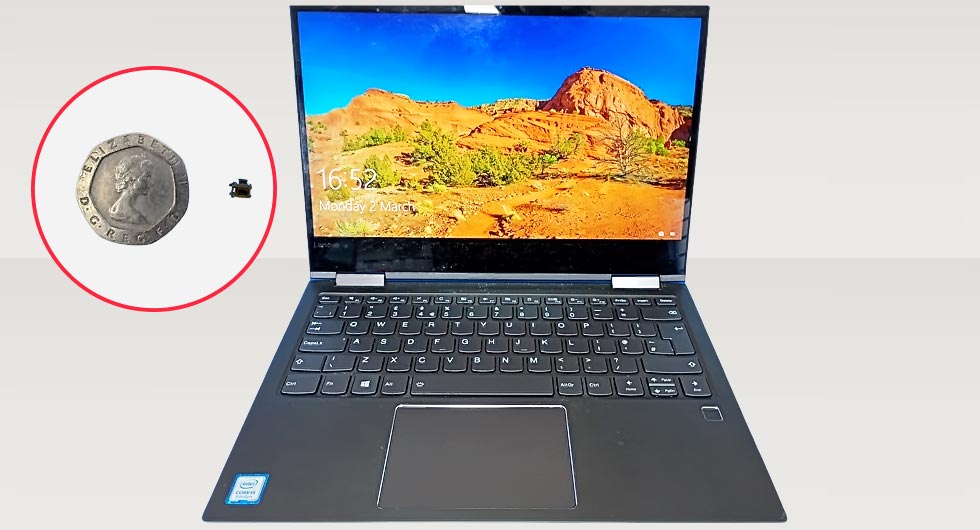
When a customer brought in their Lenovo Yoga 730-13IWL laptop, the issue seemed straightforward at first glance. The device showed no response when pressing the power button, despite a known good charger and confirmed battery health. However, as with many ultrabooks, the underlying fault was far more delicate than a simple power issue.
Diagnosing the Fault
Initial inspection ruled out common causes such as battery failure or charging circuit faults. The laptop showed intermittent signs of life when slight pressure was applied near the power button area, which pointed towards a mechanical or contact-related issue rather than a power delivery fault.
Further teardown revealed the real cause: a failed surface-mounted micro switch beneath the external power button. These switches are incredibly small and prone to wear, especially in devices with frequent daily use.
Common symptoms of this failure included:
- No response when pressing the power button
- Intermittent power-on when applying pressure
- No visible damage externally
Sourcing a Replacement Micro Switch
One of the more challenging aspects of this repair was finding a suitable replacement. The original OEM component was not readily available through standard suppliers, which is often the case with highly specific surface-mounted parts.
After some research, we identified a compatible micro switch sourced from China. Although not branded as an exact OEM replacement, the dimensions and contact layout matched closely enough to justify testing.
Key considerations when selecting the part:
- Matching footprint and pin configuration
- Similar actuator height and tactile response
- Reliable supplier with consistent stock
Fortunately, the replacement component aligned perfectly with the original board layout.
Precision Replacement Process
Replacing a micro switch of this size requires careful handling and precision tools. The existing faulty switch was removed using controlled heat to avoid damaging surrounding components.
The replacement process involved:
- Cleaning the solder pads thoroughly
- Aligning the new switch accurately
- Securing it with precise soldering under magnification
Given the compact design of the Lenovo Yoga 730 motherboard, this stage demanded steady control and attention to detail.
Restoring Full Functionality
Once the new micro switch was in place, the laptop powered on immediately with a normal button response. The tactile feedback felt consistent, and repeated testing confirmed stable operation.
This type of repair highlights how a tiny component can completely disable a device, yet be resolved effectively with the right expertise and parts sourcing.
Benefits of this repair approach:
- Avoids costly motherboard replacement
- Preserves original device integrity
- Restores full usability quickly
Why Micro Switch Failures Occur
Surface-mounted switches are designed for compact devices, but they are not immune to wear. Over time, repeated pressing can degrade internal contacts or cause mechanical fatigue.
Factors that contribute include:
- High usage frequency
- Dust or debris ingress
- Slight flex in the chassis over time
In this case, the failure was purely mechanical, making it a perfect candidate for targeted component replacement rather than broader repair work.
A Practical Outcome
Despite the initial challenge of sourcing a non-OEM component, the repair process was a success. The replacement micro switch functioned exactly as needed, demonstrating that with careful matching and skilled installation, alternative parts can deliver reliable results.
For the customer, it meant their Lenovo Yoga 730-13IWL was back in full working order without the expense of major component replacement or device upgrade.