
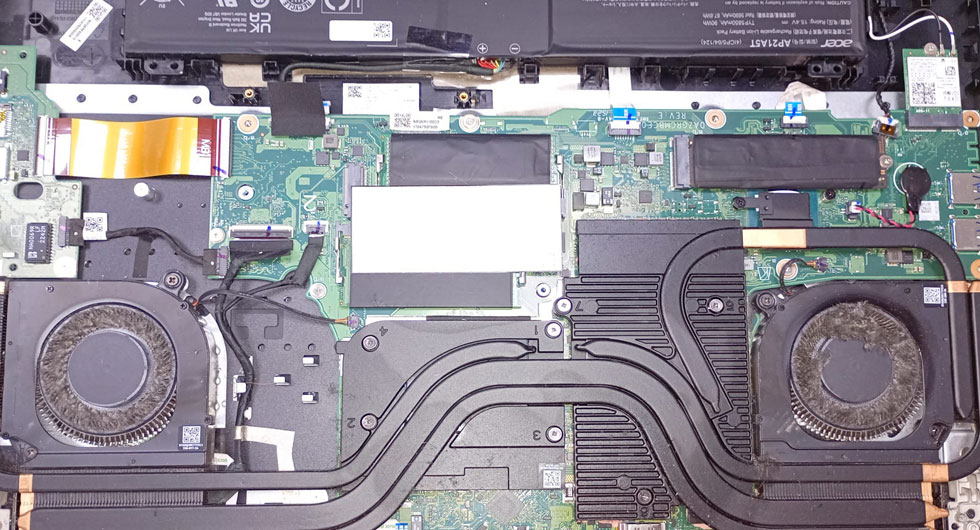
Gaming laptops like the Acer Predator Helios series are powerful machines, but that performance comes with a price—heat generation. When we opened up this particular Helios for a routine fan service, the extent of debris accumulation was significant. Dust, pet hair, and fibres had built up across both cooling fans and heat sink fins, severely restricting airflow and causing the system to run hot and loud.
The Problem with Debris Buildup
Over time, every laptop accumulates dust through its intake vents. Gaming laptops are particularly vulnerable because their high-performance components generate substantial heat, requiring aggressive cooling solutions that pull in more air—and consequently, more debris. This Helios showed classic symptoms: increased fan noise, higher temperatures during gaming sessions, and occasional thermal throttling where performance drops to prevent overheating.
The debris we found wasn’t just surface-level dust. It had formed a dense mat across the heat sink fins, acting as an insulating blanket rather than allowing heat to dissipate properly. Both fans were clogged, forcing them to work harder whilst moving less air—a recipe for premature fan failure.
Professional Fan Service Process
A proper fan service involves complete disassembly to access the cooling system. We carefully remove the fans from their mounting points, clean the heat sink assembly thoroughly, and inspect fan bearings for wear. In this case, the fans themselves were salvageable after cleaning, but we’ve seen situations where accumulated debris has damaged fan bearings beyond economical repair.
We also replace the thermal paste on the CPU and GPU during this service. Thermal paste degrades over time, and if you’re already accessing the cooling system for cleaning, it makes sense to refresh this crucial thermal interface material.
Preventing Future Buildup
Whilst you can’t prevent dust accumulation entirely, regular maintenance extends your laptop’s lifespan significantly. We typically recommend gaming laptop owners consider professional cleaning every 12-18 months, depending on their environment. If you have pets or notice your laptop running hotter than usual, don’t wait—early intervention prevents more expensive repairs down the line.
After service, this Helios ran noticeably quieter with temperatures dropping by 15-20°C under load. That’s the difference proper maintenance makes.