
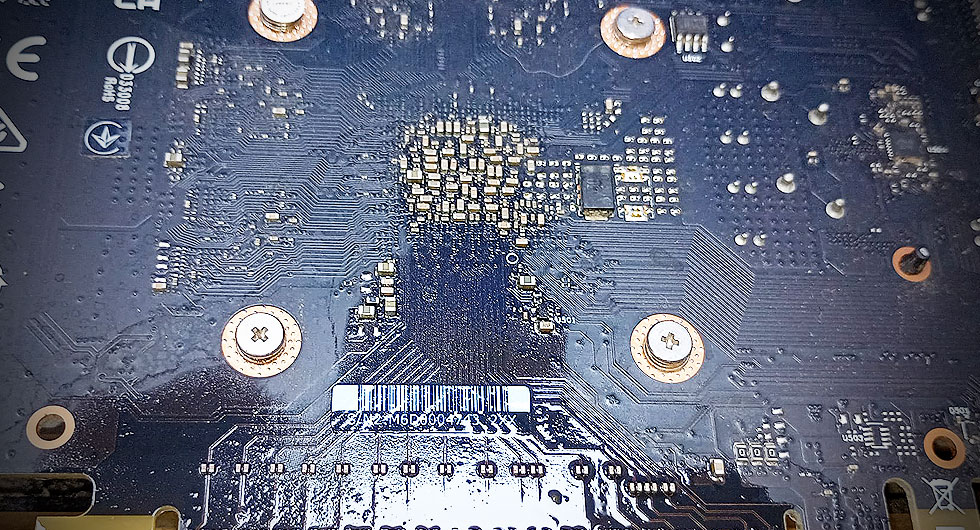
You’d think an enclosed desktop PC tower sitting safely under a desk would be immune to liquid damage. After all, these aren’t laptops that get knocked over with coffee mugs nearby or portable devices carried in rainy weather. Yet we regularly encounter graphics cards that have suffered water or liquid contamination, and the circumstances are often more surprising than you’d expect.
How Does Liquid Get Inside a Desktop PC?
The most common culprits include ceiling leaks from floors above, particularly in offices or flats where plumbing runs overhead. A slow drip over several hours can find its way through ventilation grilles and settle directly onto components. Radiator leaks nearby can create condensation or direct splashes during bursts. We’ve also seen cases where drinks were placed on top of tower cases and eventually spilled through top-mounted fan vents.
Less obvious sources include liquid cooling system failures, where coolant escapes and drips onto the graphics card below, or even high humidity environments where condensation forms on cold components when temperature fluctuations occur rapidly.
Recognising Liquid Damage on Your Graphics Card
Visual inspection typically reveals the problem immediately. Look for discolouration on the PCB, white or green crusty deposits around components (corrosion), or water marks. The damage might affect the card’s power delivery circuitry, memory chips, or the GPU core itself. Sometimes the liquid has already evaporated, leaving behind only mineral deposits or corrosion that interferes with electrical connections.
Symptoms include display artifacts, failure to output any video signal, system crashes during graphics-intensive tasks, or the PC failing to POST entirely when the card is installed.
The Recovery Process
The first step involves careful inspection under magnification to assess the extent of contamination. We clean affected areas using appropriate solvents and ultrasonic cleaning where necessary. Corrosion must be removed from traces and component legs without damaging the delicate PCB.
Component-level diagnosis follows to identify any chips or circuits damaged beyond cleaning. Power delivery components, memory modules, and capacitors are common casualties. If the GPU core itself hasn’t been compromised, replacement of damaged supporting components can often bring the card back to life.
Prevention Measures
Simple environmental awareness prevents most cases. Keep desktop PCs away from potential leak sources, never place drinks on or directly above cases, and ensure adequate ventilation without creating condensation risks. For systems in vulnerable locations, regular visual inspections can catch problems before catastrophic damage occurs.
If you suspect your graphics card has suffered liquid exposure, power down immediately and seek professional assessment. The longer contaminated components remain powered, the more extensive the corrosion damage becomes. Should your PC develop any further faults and require a PC repair, then just contact us and we will help you.